A 60W cable is a candidate when your intended charging setup fits within its documented capability. To support a setup above 60W and up to 100W, inspect a cable documented for that higher requirement. Neither number alone establishes charging speed, device compatibility or video support.
If your setup requires more than 100W, this is not a choice between these two ratings. Check the required cable and power profile for that setup instead.
Find your charging requirement · Work through the decision · Read the label
Start with the device, not the cable
Find the charging guidance for your exact phone, tablet or laptop. Record the required connector and any recommended adapter power or charging profile. Then read the output specification of the charger port you plan to use. A charger’s mains input label is not the same as its USB output capability.
Do not assign one wattage to every laptop. For example, Apple’s Mac adapter guide ties its recommendations to particular models and advises using at least the recommended adapter wattage for the best charging experience. That is model-specific manufacturer guidance, not a universal laptop rule.
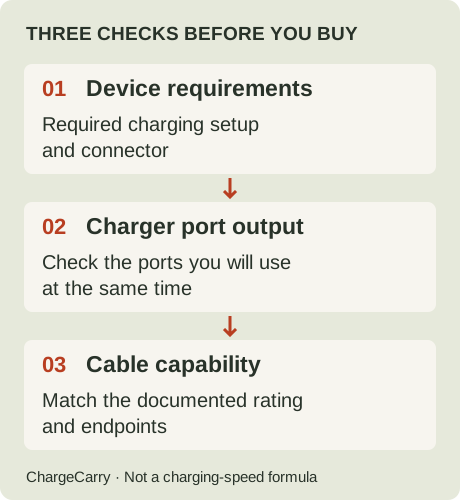
ChargeCarry illustration: use these as three checks, not a formula that predicts charging speed.
Write your choice in one sentence: “I need this cable to connect this device to this charger port, using this documented charging setup.” If any of those details is missing, resolve it before buying solely on the cable’s wattage label.
Three charging situations
The numbers below are illustrative requirements, not specifications or test results for a particular device.
| Intended setup | Cable decision | What still needs checking |
|---|---|---|
| A documented 30W charging setup | A 60W-rated cable may be sufficient; a 100W label is not itself a reason to upgrade. | Endpoints, required charging profile and the actual charger port. |
| A documented 65W charging setup | A 60W cable does not support the full stated requirement. Inspect a suitable higher-rated cable, such as a documented 100W option. | The charger must provide the required output; replacing the cable does not upgrade the charger. |
| A documented requirement above 100W | Neither a 60W nor a 100W rating covers the requirement. | Manufacturer guidance for the higher-power setup, including cable and charger support. |
These checks do not establish whether a device will charge at a lower rate with another combination. That behaviour needs documentation for the device and charger; do not turn a mismatch into either “will not charge” or “will work perfectly.”
What do the two cable options look like?
These are the exact product variants in our catalogue. The captions identify the listed length and pack quantity; the images are not shown to a shared physical scale.

Listed variant: 6 ft per cable · 2-pack
Anker official product image · Brand-supplied
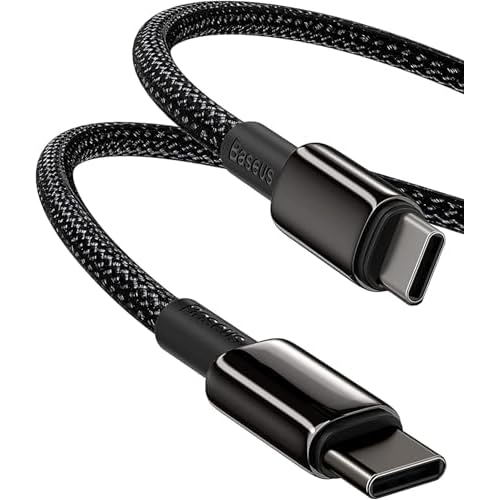
Listed variant: 2 m · Single cable
Baseus official product image · Brand-supplied
Official images show the products, not charging performance. Compare the documented specifications and limitations before choosing.
Will a 100W cable charge my phone faster?
Not on the strength of that label alone. USB-IF describes Power Delivery as allowing a device to request the power it needs. A cable rating is one capability in the connection; it is not power forced into the phone.
If your existing cable already supports the intended charging setup, a larger wattage number does not establish a speed improvement. If the existing cable cannot support that setup, investigate the complete connection before assuming the cable is the only limit. We have not measured charging time for either cable in our catalogue.
Sharing a charger changes the question
For travel, write down whether the laptop and phone must charge together. Read the charger’s output for that exact occupied-port combination, rather than assigning its headline maximum to every port.
A 100W cable does not reserve 100W for one device. If the charger’s documented shared-port output does not meet your planned requirement, the cable label cannot resolve that. Consider a different charging schedule or a charger with a documented combination that fits your devices.
Use the travel charging checklist to keep simultaneous charging and cable requirements together. It does not infer model-specific wattages.
Does 100W mean faster files or monitor support?
No: a power label does not establish a data rate or a display capability. Read those separately on the exact cable, and check the ports at both ends. See our charging, data and video guide for that distinction.
This matters if one cable is intended to replace both a charging cable and a display connection. Do not count it as a replacement until its video capability has been verified. Our current two cable records do not establish display suitability.
Why do new cable logos say 60W or 240W?
USB-IF’s current USB-C cable marking requirements require 60W or 240W power markings for cables entering its compliance program. Its Power Delivery overview explains the move from the earlier 100W limit to higher power levels.
Those certification-program rules do not turn an existing retailer’s 100W listing into a 240W product. Keep the rating documented for the actual item, and do not infer certification from a store title. We have not established USB-IF certification for the two products in our catalogue.
Once power fits, choose reach and quantity
Check the distance from the charger to a secure resting place for your device. Count simultaneous connections, and inspect the cables you already own. A spare is a contingency choice; it is not a requirement to buy a larger pack. Work through the travel cable length and quantity guide for packing examples.
For the actual items we have documented, use the Anker 60W and Baseus 100W travel cable comparison. That page contains official product images, exact listing details, evidence gaps and disclosed purchase links. It is the product-selection page; this guide explains the wattage decision. We have not ranked either product by speed, durability or value.
Sources and editorial note
Research and illustration by ChargeCarry. Published September 15, 2026. Product images added September 16, 2026. The three official sources below were checked September 15, 2026; linked product records retain their own evidence dates. Examples are editorial decision aids, not hands-on tests or compatibility guarantees.
- USB-IF: USB Power Delivery — power requests and the development of higher power levels.
- USB-IF: Cables and Connectors — capabilities and current cable marking requirements.
- Apple: Use a power adapter with your Mac — model-specific charging guidance.
Read our research method and how affiliate links work.