Choose length for reach, and quantity for the connections you need at the same time. A longer cable does not replace a second connection. A two-pack does not help if both cables have the wrong connectors or neither reaches the place where your device will rest.
Start with the cables you already own. This guide gives you a packing method, not a universal requirement to buy another cable.
Choose a length · Count your connections · Decide on a spare · Share a cable
How long should a travel charging cable be?
Measure the route from the charger port to the device, following the path the cable will actually take. That may run around a desk edge rather than straight through the air. Allow enough slack to place and unplug the device without pulling on either connector. There is no single extra-slack measurement that fits every arrangement.
An outlet behind a bedside cabinet and a power bank beside a phone are different situations. Choose for the arrangement you expect, and acknowledge any unknown hotel layout instead of assuming every outlet is next to a table.
| Charging situation | What to check before choosing a length |
|---|---|
| Phone beside a power bank | Check the distance between both ports in their intended resting positions. Extra reach may offer little benefit here. |
| Phone on a bedside table | Trace the route from the charger to the table. Avoid a plan that leaves the phone hanging from its cable. |
| Laptop on a desk | Account for the charger location, desk edge and the laptop’s charging port. Check that your working position does not pull the cable taut. |
| Outlet far from a useful surface | Reconsider where to charge before choosing a cable route across a walkway. A longer cable alone does not solve the layout. |
These are planning examples, not measurements of hotels or vehicles. If the destination layout is unknown, a longer cable can offer more placement options, but only when its documented capabilities also meet your needs.
Is a 1 m or 2 m USB-C cable better for travel?
Use those lengths as candidates to check against your route. If the route and slack fit comfortably within 1 m, a 1 m cable may fit that arrangement. If they do not, check a longer option such as 2 m. Neither length is automatically the right choice for every trip.
Do not use length as a shortcut for charging speed, data rate or display support. USB-IF explains that cables have different capabilities; select for the actual connection. When a product offers multiple lengths, check the specifications for the exact length you intend to buy rather than assuming every variant is identical.
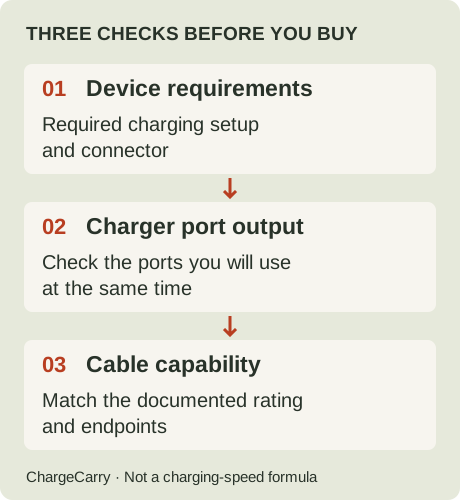
ChargeCarry illustration: reach is a separate check after these three capability checks. This is not a charging-speed formula.
For the power decision, read 60W vs 100W USB-C cables. For file transfers or monitors, use the separate charging, data and video checks.
How many cables do you actually need?
Write down your busiest charging moment, then count the separate wired connections it requires. Do this by connector and accessory type, not just by the number of devices in your bag.
- One phone, charged on its own: one suitable charging connection covers that plan. A spare is a separate decision.
- Phone and laptop charging together: plan two suitable connections and check that the charger supports the required occupied-port combination. Two cables do not create a second charger port or guarantee sufficient shared power. Use the single-port vs multi-port charger guide to check the arrangement.
- Phone and headphones charged one after the other: one cable may serve both if the endpoints and charging requirements match and you have enough time to swap them.
- Phone plus a watch with a dedicated charging accessory: count that accessory separately. A generic USB-C cable is not automatically a replacement for it.
A cable connected to a monitor or drive may already be occupied when you want to charge another device. Count it as available for another job only if your schedule allows you to disconnect it and its capabilities fit the second job.
Can one cable charge your phone, watch and earbuds?
Count complete charging connections, not just removable cables. A single cable can cover two jobs in sequence only when the connectors and documented charging requirements fit both. A watch charging puck or other dedicated attachment still belongs on the packing list.
For an exact manufacturer example, Apple’s USB-C iPhone guidance describes charging a USB-C device with a USB-C cable, a Lightning device with a USB-C to Lightning cable, and Apple Watch with its magnetic charging accessory. These are different connection arrangements. The examples do not establish compatibility for every phone, watch or earbuds case, and they are not a reason to replace equipment that already works.
Make a small connection inventory before trying to reduce your kit:
| Item you will charge | Record before sharing a cable | Packing decision |
|---|---|---|
| Phone | Device connector, intended source and required charging capability | Keep one complete, documented connection |
| Earbuds case | Exact case connector and charging instructions | Share sequentially only if the same connection meets both devices’ requirements |
| Watch | Required charging attachment and its source-side connector | Count the dedicated accessory even if it plugs into the same charger |
| Power bank | Refill input, cable and whether it is needed while another device charges | Add a connection or reserve a separate charging time |
This inventory is our planning worksheet, not a tested compatibility table. For wireless or proprietary accessories, use the exact manufacturer’s instructions rather than assuming that a USB-C-shaped input makes the whole charging arrangement interchangeable.
Work through a mixed-device evening
Suppose a phone and earbuds case both document a suitable USB-C charging connection, while a watch requires its own magnetic accessory. This is a hypothetical schedule. If the phone and case can charge one after the other, one suitable cable plus the watch accessory may cover those jobs. The charger still needs a documented arrangement for whatever you connect at the same time.
If you need the phone and case together, that shared cable is already occupied: add a suitable second connection or change the schedule. If the case instead has a different connector, write down that connection separately. A multipack of the phone’s cable does not resolve a mismatched endpoint.
If you also need to refill a power bank overnight, include that job before finalising the count. The power-bank refill guide explains why separate input/output labels do not establish simultaneous charging support.
Before buying a compact multi-connector cable, request capabilities for each combination you intend to use and check whether its instructions allow the simultaneous arrangement you want. Several tips in a product photo are not evidence that all devices can charge together at their required power. If that detail is absent, keep it unconfirmed and plan with documented connections.
A worked packing example
Suppose you want to charge a phone and a laptop together at a desk, then recharge headphones later. This is a hypothetical schedule, not a compatibility claim about any model.
First, record the two desk connections and measure their routes separately. Next, check the charger’s documented output with both ports occupied. Finally, check whether the headphones can use one of those cables after the phone or laptop is disconnected.
If all those checks pass, the planned schedule needs two charging cables. If the headphones require another connector, add the appropriate connection. If they must charge at the same time, revisit both cable quantity and available charger ports. This is why counting three devices does not always yield three interchangeable cables.
Use the travel charging checklist to collect the remaining checks. It does not infer your model’s wattage or confirm compatibility.
Should you pack a spare charging cable?
Treat a spare as a contingency choice. Consider how disruptive a lost or unusable cable would be, whether another cable you already carry can do the same job, and whether you could obtain a suitable replacement during the trip.
A spare needs to cover the connection you are protecting. A cable that can charge your phone is not necessarily a spare for a laptop display connection. Keep the purpose clear before adding weight or buying a multipack.
Inspect the cables you intend to pack. Apple’s accessory-care guidance advises unplugging by holding the connector rather than pulling the cable and stopping use of damaged accessories. Follow the care instructions for your own equipment; we have not tested cable durability or predicted failure rates.
Before buying a longer cable or a two-pack
Write a short packing note: connection, required capability, usable reach, time needed, spare purpose. Compare that note with what you own, then identify the actual gap.
Our travel USB-C cable comparison shows the two exact product records currently in our catalogue, with official images, listed lengths and pack quantities, source dates and unresolved capability details. Use it only if one of those recorded options fits your plan. It is not a complete market survey, and a larger pack is not automatically better value for your needs.
The comparison page includes disclosed affiliate purchase links; we may earn a commission from eligible purchases. Read our affiliate disclosure.
Sources and editorial note
Research by ChargeCarry. Published September 18, 2026. Updated October 23, 2026 with mixed-device connection planning. Official sources checked October 23, 2026:
- USB-IF: Cables and Connectors — capability differences and selecting a cable for its intended connection.
- Apple: Charge and connect with the USB-C connector on your iPhone — distinct USB-C, Lightning and Apple Watch connection examples; exact-device instructions remain necessary.
- Apple: Using power adapters, cables, and duckheads — connector handling and damaged-accessory guidance for Apple equipment.
The packing scenarios, quantity examples and reach method are editorial planning aids, not manufacturer-prescribed packing lists or hands-on product tests. Linked product records retain their own evidence dates. See our research method.