A single-port charger can fit a one-device-at-a-time routine. A multi-port charger is a candidate when devices need to charge together—but only if its documented shared output fits those devices. Count the connections you need at the same time before choosing the number of ports.
This is a buying method, not a charger ranking. We have not measured charging speed, temperature or reliability, and we are not recommending a particular charger for every laptop.
Choose by routine · Check shared output · Read a power-sharing table · Before you buy
Which arrangement fits your trip?
Separate your overnight routine from the time you have between meetings or departures. A schedule that works when you can swap cables may not work when you need two devices ready together.
| Your planned routine | Arrangement to consider |
|---|---|
| One phone, with no other simultaneous charging | A suitable single-port charger may cover the plan. Extra ports are optional. |
| Phone and headphones charged in sequence | One port may work if you can swap the required cables and have enough time. |
| Laptop and phone charging together at one outlet | Check a multi-port charger with a documented output combination suitable for both. |
| Two travellers charging in different rooms | Separate chargers may fit the locations better than one shared unit. |
These are editorial scenarios, not compatibility guarantees. A multi-port unit can consolidate wall chargers, but you still need the right cables and any dedicated charging accessories. If you lose that shared charger, several planned connections may become unavailable together; decide whether that matters for your trip.
Start with each device’s charging guidance
For every device, record the connector and the manufacturer’s recommended charging setup. Then compare those requirements with the candidate charger’s USB output specifications. The mains input rating is a different check.
For example, Apple’s Mac power-adapter guidance gives recommendations by Mac model. It advises using at least the recommended adapter wattage for the best charging experience. Do not translate the word “laptop” into one assumed power requirement.
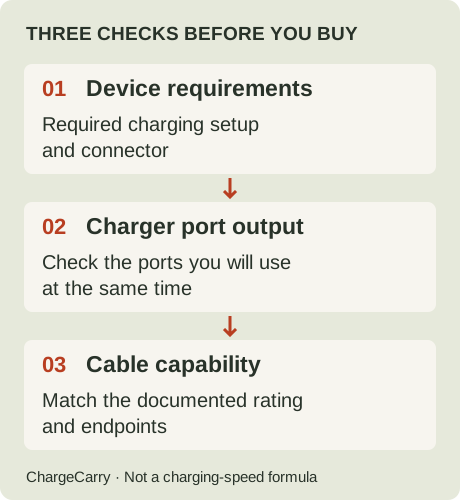
ChargeCarry illustration: when ports are shared, the middle check must cover that occupied-port combination.
The USB-IF Power Delivery overview describes devices requesting the power they need. A charger’s headline wattage is not a promise that every connected device receives that amount or charges at an identical speed.
Read the occupied-port combination
Look for port names such as C1, C2 and A1 in the manufacturer’s specification or manual. Check the output with your intended ports used together, including supported charging profiles. Do not add the maximum output of each port when those maxima are specified for separate, single-device use.
A useful purchasing note is: “With my laptop on this port and my phone on that port, the manufacturer documents this output arrangement.” If the relevant combination is missing, keep it unconfirmed. More sockets do not fill the evidence gap.
Also check any instructions about connecting or disconnecting devices. Do not assume a charger keeps the same output arrangement as ports become occupied or free.
A documented example: two ports do not mean twice the power
Apple’s 35W Dual USB-C Port Power Adapter instructions cover its standard and compact versions. For a Mac laptop paired with an iPhone or iPad, Apple documents up to 17.5W for each device. For a Mac laptop or iPhone paired with an Apple Watch or AirPods, it describes up to 27.5W for the former and up to 7.5W for the latter.
These are Apple’s documented examples for those adapters, not our test results or rules for other dual-port chargers. They illustrate why “35W” does not mean 35W from each port at the same time. They also show why simply dividing every charger’s total by its port count is not a reliable buying method.
Apple advises disconnecting the other device and its cable when one device needs more power. Whether that solution fits your trip depends on whether sequential charging is acceptable. This example is not an endorsement of that adapter for your particular Mac.
How to read a multi-port charger’s power-sharing table
Read one operating combination at a time. A row labelled “C1 only” and a row labelled “C1 + C2” describe different situations; the first row does not establish what C1 can provide in the second.
- Match the exact charger. Confirm the model and regional version against its manual. Do not borrow an output table from another charger with a similar name.
- Match the occupied ports. Copy their labels, including USB-A ports if used. A three-port combination needs its own evidence; a two-port row is not a substitute.
- Assign each device to a port. Keep that assignment beside the manufacturer’s documented shared output. Do not treat an asymmetric split as interchangeable unless the documentation says it is.
- Check more than watts. Confirm the device’s required charging profile, the port’s supported output and the cable’s capability. A matching wattage is not a complete compatibility check.
- Recheck after changing the plan. Adding a device or changing ports means checking another combination, not carrying forward the old figures.
Worked example: a hypothetical 65W charger
The table below is invented solely to practise reading an output table. It is not a specification, test result or recommendation for any charger we sell or link to.
| Hypothetical manual row | How to read it |
|---|---|
| C1 alone: up to 65W | This figure applies to the stated single-port arrangement. |
| C1 + C2: up to 45W + 20W | In this example, C1 has a 45W ceiling and C2 a 20W ceiling with both used. Neither has a 65W allowance in this row. |
| C1 + C2 + A1: not provided | Three-device output remains unconfirmed. Do not invent a three-way split. |
Suppose your planned laptop setup calls for 60W while your planned phone setup calls for 20W. The hypothetical 45W + 20W row does not cover the full stated laptop requirement, even though the charger’s headline says 65W. That does not establish that the laptop cannot charge at all; lower-power behaviour needs guidance for the actual laptop.
If the planned laptop setup instead calls for 40W, the same row clears the wattage check for those two planned loads. You still need to check charging profiles, endpoints and cables before calling the combination suitable. These numbers are illustrative requirements, not specifications assigned to device categories.
Do not assume an unused part of a port’s allowance transfers to another port. For example, a phone drawing less than its allocation does not establish that a laptop can exceed the manual’s stated limit. Look for explicit manufacturer guidance on dynamic allocation.
What changes when you add a third device?
Find the row for all three occupied ports and repeat the checks for every device. If the manual omits that arrangement, either use a documented arrangement at a different time or continue researching. A free socket is not evidence of sufficient shared output.
Keep output allocation separate from connection behaviour. A power table does not, by itself, promise that another device will charge without a brief interruption when a cable is connected or removed. Do not infer uninterrupted operation from a wattage label; check the manufacturer’s guidance for the exact model.
Before packing, write one line for each charging session: devices → named ports → documented shared output → required profiles and cables → unresolved checks. Use the travel checklist to keep those unresolved checks visible.
Is one multi-port charger better than two single-port chargers?
Compare the complete arrangement you would pack. One unit may use fewer wall outlets, while two units let you place devices in different locations or keep a separate charger available. Neither arrangement automatically establishes lower packed weight, faster charging or better reliability.
If packed size matters, compare the exact chargers, plug accessories and cables you would carry. If simultaneous charging matters, compare documented output combinations first. For international trips, separately check the equipment’s input rating and destination plug requirements; the number of USB ports does not settle those questions.
A five-check buying list
- Schedule: which devices must charge together, and which can wait?
- Requirements: what charging setup does each device manufacturer specify?
- Ports: does the charger document the actual occupied-port combination you need?
- Cables: do the endpoints and documented capabilities fit each connection?
- Placement: can every device rest securely within reach of its cable?
Use the travel charging checklist to collect these checks. For cable power, see 60W vs 100W cables; for reach and packing quantity, see how many cables to bring.
Once you have identified an actual cable requirement, our cable comparison provides the two existing product records, source dates and capability gaps. It includes disclosed affiliate links; we may earn a commission from eligible purchases. We do not yet have a verified charger shortlist to recommend here. Read our disclosure.
Sources and editorial note
Research by ChargeCarry. Published September 22, 2026. Updated September 25, 2026 with a power-sharing table walkthrough and explicitly hypothetical worked example. Official sources rechecked September 25, 2026:
- USB-IF: USB Power Delivery — power requests and power management.
- Apple: Use a power adapter with your Mac — model-specific guidance.
- Apple: How to use the 35W Dual USB-C Port Power Adapter — shared-output examples; support article dated January 24, 2026.
Travel routines and the buying checklist are editorial planning aids. Linked cable records retain their own evidence dates. No new charger offer, physical test or universal compatibility claim is implied. See our research method.