Updated October 16, 2026 · Sources checked October 16, 2026 · Research guide · No hands-on testing
Before you buy, look for three separate answers: supported charging power, data rate, and explicit video support. A USB-C connector alone does not establish any of those capabilities. USB-IF distinguishes the connector from both data protocols and Power Delivery. USB-IF terminology guidance, pages 3–5.
In this guide
- Choose by the job you need to do
- Understand the charging rating
- Read the data rate
- Check display support
- Choose a portable-monitor cable
- Use the buying checklist
- Plan your travel connections
- Common questions
Start with the job in your bag
Our buying approach is to write down the connection you actually need before comparing products:
- Charge a device: note the device’s charging requirements and the charger port you will use.
- Move files: note the two devices and check the stated data capabilities of both ports and the cable.
- Connect a display: look for explicit display compatibility across your computer, cable and monitor.
Treat this as a shopping checklist, not a prediction of charging speed or a compatibility guarantee.
Charging: watts describe a power capability
USB Power Delivery lets devices request power. A cable marked for a higher wattage does not force that amount into a phone. The device, power source and cable must support the intended arrangement. USB-IF describes PD as letting each device take the power it requires. USB-IF Power Delivery overview.
For travel planning, check the specifications of your particular charger and device first. Our recommendation: do not buy a cable purely because its wattage number is larger. A cable’s listed ceiling is not a measured charging rate, and this guide does not estimate charging times.
Data: read the rate separately
USB-IF describes USB 2.0 data operation at up to 480Mbps and explains that USB-C does not automatically mean USB 3.2 or USB4. A USB 2.0 connection can coexist with Power Delivery. USB-IF terminology guidance.
When your trip includes file transfers, make the data rate a separate item on your checklist. Do not use the charging wattage as a substitute for it. These are advertised capabilities, not promises about the time a particular transfer will take.
Video: require an explicit statement
Look for a manufacturer statement that names supported display functionality. For example, Apple specifically describes video support for its 0.8 m Thunderbolt 3 cable, including DisplayPort HBR3. That is evidence for that Apple cable, not every cable with the same connector. Apple cable documentation.
USB-IF states that a USB 2.0 Type-C cable does not include Alt-Mode capabilities. Our practical rule: if a product listing does not document the video mode your setup needs, leave video compatibility unverified. USB-IF terminology guidance.
Portable monitor cable: checks before you buy
Check the whole connection before replacing the cable. A portable monitor introduces a display path and a power plan; a charging specification answers only part of the buying question.
ASUS’s portable-monitor guidance, updated February 23, 2026, distinguishes DP Alt Mode connections from USB display solutions using DisplayLink and a driver. For the DP Alt Mode route, it tells readers to check display support on both the computer and monitor, consult exact-model specifications and use the cable supplied with the monitor. It also recommends connecting the portable monitor to a power source. Those instructions are a manufacturer example, not a compatibility promise for every portable display.
Start with the monitor manual and record the following before shopping:
| Part of the setup | Evidence to record | What leaves the choice unresolved |
|---|---|---|
| Computer port | Exact laptop model and named port with the required display output | The specification only says USB-C or charging |
| Cable | Explicit video capability for the intended connection | A wattage or data-rate headline alone |
| Monitor input | Exact model, intended input and connection instructions | A connector photo without its documented function |
| Power plan | The manual’s power connection and any required separate supply | Assuming one cable will power the entire setup |
This is an editorial buying worksheet. A completed row does not compensate for another row with missing evidence. Keep the cable decision pending until the intended connection is documented.
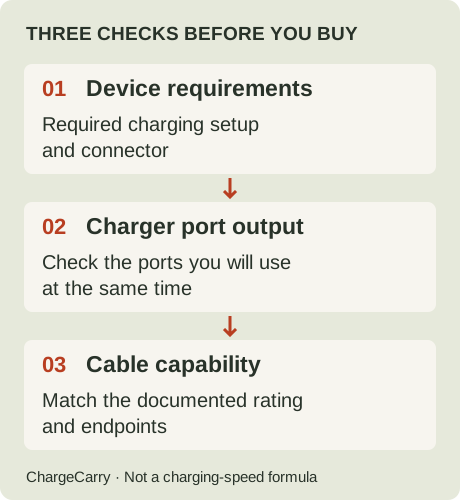
ChargeCarry planning illustration. For a display connection, add the monitor’s input and power instructions to these checks.
If the monitor gets power but has no picture
Do not treat that observation as proof that the cable is faulty or that a higher-wattage cable will solve it. Work back through the table: which exact computer port is in use, which display path does the monitor require, and what does the cable document? Follow the monitor’s own setup and troubleshooting instructions before buying a replacement.
If the manual specifies a driver-based USB display connection, follow that model’s instructions; do not apply DP Alt Mode advice as if every USB monitor worked the same way. This guide does not diagnose a particular device or ask you to install third-party software.
Decide what earns a place in your bag
Write one line for the planned desk setup: computer port → cable → monitor input; monitor power → documented supply. If a hub or adapter is part of the route, include it in that note and check its documentation too. Mark any missing field as unconfirmed instead of replacing it with a guess.
Try the documented arrangement before departure. A successful check of your own setup is useful packing evidence, but it does not verify another cable length, laptop port or display model. Keep the laptop business-trip checklist for the wider packing plan and the PD/PPS guide for charging-profile questions.
Use the label, then check the exact listing
USB-IF’s compliance program requires power markings and, for cables other than USB 2.0, data-rate markings. These label rules help explain why power and data should be read independently. They do not establish certification of any product discussed on ChargeCarry. USB-IF marking requirements.
Our recommended final check:
- Match the exact model or ASIN, length, color and pack option.
- Find a separate specification for each capability you need.
- For multi-connector cables, ask which connector combination each claim covers.
- Keep missing specifications on your list of unanswered questions.
- Recheck the selected retailer variant before placing an order.
Plan the connections before you pack
These are planning examples, not tested device combinations. Start with your own device manuals, then use the questions below to decide what evidence a product must provide.
Phone and charger
Write down the port on each end. If both are USB-C, look for a matching cable and documented charging support. If one is USB-A or Lightning, a USB-C-to-USB-C cable does not match that connection. Do not let a generic “phone compatible” label replace this check.
Laptop, phone and one charging kit
List whether you need to charge both devices at once. If you do, check the charger manufacturer’s simultaneous-output specifications before assuming one port’s advertised maximum applies to both ports. A cable specification cannot answer a charger power-allocation question. Keep this unresolved until the particular charger is documented.
Laptop and external storage
Make data capability a requirement before looking at power. Write the required transfer standard next to your storage device and computer port, then find a cable with matching documented capabilities. A listing that emphasizes charging alone leaves an important question unanswered.
Laptop and portable monitor
Start with the monitor’s connection instructions. Ask whether the planned connection carries video, supplies power, or requires separate cables. Look for the named video capability in the cable and computer documentation; do not infer it from a photo of the connector.
Our packing recommendation: give each cable a named job. If two cables appear to do the same job, compare their documented capabilities before deciding that one is spare. Keep a backup only when that redundancy matters to your trip.
Common questions
Does a higher wattage mean faster data?
No. Power and data are separate specifications. Check the rate printed in Mbps or Gbps as well as the wattage. The USB-IF guidance explains the distinction between the connector, data protocols and Power Delivery.
Can I use a charging cable with a monitor?
Only make that choice when the exact cable documents the video capability your setup requires. Apple’s own documentation contrasts a charge cable without video support with its Thunderbolt 3 cable that supports video. That example is model-specific. Apple cable comparison.
What if the listing never mentions video?
Leave it unverified and ask for the exact specification before buying for a display. “Not verified” is a record of missing evidence, not a claim that we tested it and found it failed.
Is a four-in-one cable a replacement for every cable?
Do not assume that from the connector count. Request a separate capability description for each connector combination you intend to use. This guide does not verify any particular four-in-one model.
See the checklist applied
The Anker cable product guide keeps the exact listing identity, sourced specifications and unknowns together. The specification reading table shows how those fields answer different buying questions. Neither is a performance ranking.
What this guide does not establish
We have not tested these cables, measured heat or charging performance, or assessed durability or safety certification. Travel outlet compatibility is outside this guide. Read our methodology for how claims qualify for inclusion.