Start with the charging mode your exact device supports, then check whether the intended charger port documents the required output. A large wattage number, a USB-C socket and a “fast charging” headline do not answer the same question.
This guide helps you compare specifications before packing or buying. It is not a speed test, a charger ranking or a compatibility match for every phone.
Understand the labels · Read the specification · Plan shared ports
What do PD and PPS mean?
USB PD means USB Power Delivery. USB-IF’s overview describes power management that lets devices request the power they need. It does not mean that the charger forces its maximum rating into every connected device.
PPS means Programmable Power Supply. USB-IF’s technical presentation, slide 38, describes a device-directed source with adjustable output voltage and current limit. That presentation explains the underlying concept; its 2019 examples are not a current product compatibility list.
For shopping, look for explicit PPS support and documented output ranges if your device’s desired charging mode requires it. Do not substitute a general PD headline for those details.
A four-part specification check
Keep the device guidance beside the candidate charger’s manual. Record the exact charger model and regional variant, rather than transferring specifications from a similar listing.
| Check | Record before choosing | Keep unconfirmed when |
|---|---|---|
| Device | Exact model and manufacturer-specified charging mode or setup | You only have a generic recommendation for the brand |
| Charger port | Named port, PD/PPS support and documented voltage/current outputs | The listing shows only total watts or “fast charging” |
| Cable | Both connectors and required charging specifications | Its label does not establish the requirement for that setup |
| Other devices | Occupied ports and the documented shared output | The manual omits your intended combination |
The checks work together. Passing one row does not fill a missing row. If the evidence is incomplete, keep the candidate under review or use a documented arrangement you already own.
A manufacturer example: why the maximum number is not enough
Samsung’s current Galaxy charging guidance, updated October 2, 2026, tells readers to check USB PD PPS support as well as output for Super fast charging. It notes that high maximum output alone may not enable that mode without PPS.
The page also makes cable requirements dependent on the charging setup and cautions that charger models and supported modes vary. Use its exact model guidance rather than treating a brand-level charging name as a universal cable rule.
If buying for a different device, find that manufacturer’s requirements. This example is not a recommendation to replace a working charger or a promise about a third-party product.
Read fixed outputs and PPS ranges separately
A specification may list individual fixed voltage/current combinations and a separate PPS voltage range with a current limit. Copy the relevant entries into your buying note, including the port name. Do not treat a fixed-output entry as proof of the same capability throughout a programmable range.
Here is an explicitly hypothetical reading exercise: a listing says “65W maximum,” but your desired phone setup requires documented PPS support. If the listing provides no PPS detail, the useful conclusion is PPS not confirmed. It does not establish that the charger supports PPS, that it lacks PPS, or that the phone cannot charge at all.
Likewise, a PPS label without enough detail to match the device requirements leaves work to do. Ask for the exact specification or consult the manual before turning the label into a recommendation.
Check the port arrangement you will actually use
A phone charged alone and a phone charged beside a laptop are different arrangements. Find the manual’s row for the actual occupied ports, then repeat the output-profile check. Do not assume the headline protocol list applies identically to every port and every shared-power arrangement.
Keep a note such as: phone model → desired mode → named charger port → documented output profiles → required cable → other occupied ports. Leave a blank visible until you have evidence to fill it.
Our single-port and multi-port guide covers charging schedules and shared-power tables. It remains the place to compare port arrangements; this guide addresses the missing protocol and profile checks.
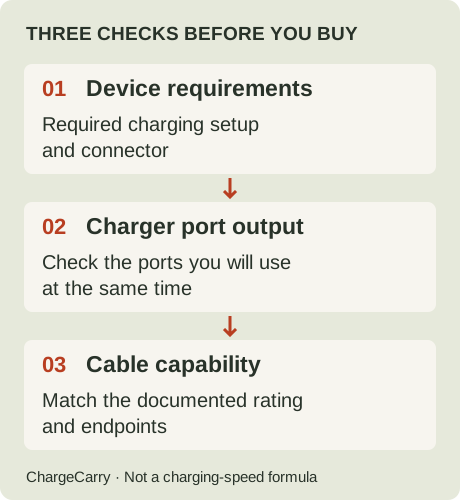
ChargeCarry illustration: the charger-port check includes supported profiles, not just the largest wattage printed on the box.
Before buying another travel charger
Compare your existing charger’s documentation first. If it meets the planned device and port arrangement, a bigger number alone does not establish a useful upgrade. If you need a missing capability, identify that gap explicitly before comparing products.
Keep expected charging performance separate from compatibility. Samsung notes that battery level, heat and device use can affect charging, and that a device does not remain at maximum power throughout charging. We have not measured charging times for your equipment or inferred them from protocol names.
For international trips, also check mains input and socket fit using the travel adapter and voltage-converter guide. PD/PPS describes the charging side of the decision; it does not settle the destination supply check.
Use the travel charging checklist to collect unresolved requirements. For cables, read 60W vs 100W capability without treating the rating as a phone charging-speed ranking.
We do not yet have a verified PD/PPS charger shortlist to recommend. Other product pages contain disclosed affiliate links; see our disclosure.
Sources and editorial note
Research by ChargeCarry. Published October 13, 2026. Official sources checked October 13, 2026:
- USB-IF: USB Power Delivery overview — device power requests and management.
- USB-IF: USB Power Delivery technical presentation, slide 38 — PPS concept; 2019 presentation, not a current product list.
- Samsung: Enable Fast charging and Fast wireless charging — current model, PPS, cable and operating-condition guidance.
The table and hypothetical scenario are editorial decision aids. No physical tests, prices or universal compatibility claims are implied. Read our research method.