Start with one complete charging connection, then add equipment only for a job that connection cannot cover. For a trip without a laptop or tablet, a suitable wall charger and cable may cover your planned charging stops. A power bank, second cable or multi-port charger needs a separate reason to earn space in your bag.
This checklist is a planning method, not a tested kit or a guarantee that a particular phone will last all day. Begin with the equipment you own and your exact phone’s charging guidance.
Make your packing note · Choose optional extras · Wired or wireless · Check before-departure-details
Write down the connections before packing
A cable must fit the charger as well as the phone. Record both ends instead of writing only “phone cable.” A USB-C phone connected to a USB-A charger needs a different connection from the same phone connected to a USB-C charger.
Apple’s USB-C iPhone guidance describes USB-C power-adapter connections and a USB-A-to-USB-C cable option for a car with a USB-A port. These are examples of why the source port matters, not a compatibility claim for every phone or accessory.
Make a short note for your own setup:
| Item | What to record |
|---|---|
| Phone | Exact model, charging connector and manufacturer guidance |
| Wall charger | Port used, supported charging output and printed input range |
| Cable | Both connectors, required charging capability and useful reach |
| Charging stop | Where the phone will rest and whether you have time to finish charging |
| Optional accessory | Its own connector or dedicated charging accessory, and when it will charge |
Do not choose a charger by copying another phone’s wattage. A higher number on a cable or adapter does not establish the charging speed your model will achieve. Use the charging, data and video guide to separate those checks.
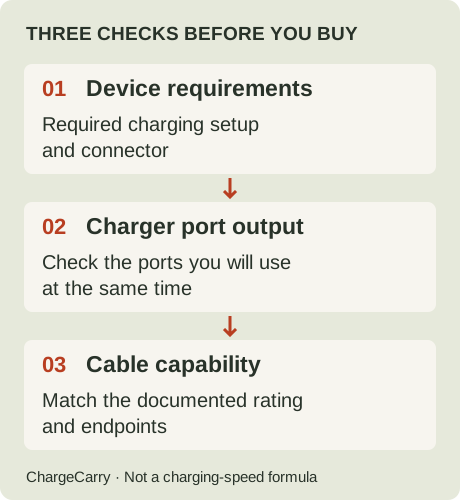
ChargeCarry illustration: match the connection first; decide how much extra equipment to carry afterwards.
When do you need an extra item?
Think through your trip’s charging opportunities rather than buying every item on a generic packing list.
| Your plan | Decision to make |
|---|---|
| Phone charges at a wall outlet each night | Start with the suitable charger and cable you already own. Check reach to a stable resting place. |
| Phone and headphones charge one after the other | One connection may serve both if their connectors and charging requirements match and your schedule allows a swap. |
| Phone and an accessory must charge together | Plan separate connections and verify the charger’s output with those ports occupied. |
| You expect long periods without a usable outlet | Decide whether a power bank solves that specific gap, then plan how to refill it. |
| Losing the only cable would seriously disrupt the trip | Consider a suitable spare or a realistic replacement plan. Do not count an incompatible cable as a backup. |
These are hypothetical situations. We have not measured your phone’s battery life, the availability of destination outlets or an ideal number of accessories.
A watch with its own charging puck still needs that accessory. “Phone-only” here means leaving the laptop and tablet behind; it does not mean assuming every small device shares the phone’s connector.
For cable reach and spare decisions, see how many charging cables to pack. For simultaneous charging, use the single-port and multi-port guide.
Should you pack a wireless charger or just a cable?
Compare complete charging setups, not just the connection touching the phone. If your existing cable arrangement covers the trip, a wireless charger is an optional change to that plan. It does not automatically remove the power adapter, its required connection or the need for a suitable resting place.
As a manufacturer example, Apple’s MagSafe Charger instructions, published September 18, 2026 and checked October 27, describe connecting the charger’s USB-C connector to a suitable power source and placing the charger on a flat, clear surface. Apple distinguishes charger part numbers, phone models and adapter requirements; its advertised peak power varies with the setup and conditions. Do not turn a MagSafe label or a large adapter rating into a promised charging time for your phone.
Use this packing comparison before adding another accessory:
| Question | Wired arrangement | Wireless arrangement |
|---|---|---|
| What travels with you? | Source, suitable cable and any required plug accessory | Exact charging accessory, its power connection, suitable source and any required plug accessory |
| Where does the phone rest? | Securely within the usable cable reach | In the position and on the surface specified by the charger maker |
| What must be compatible? | Source output, cable and phone charging requirements | Exact phone, charging accessory, case/accessory instructions and source requirements |
| What job remains uncovered? | Record any device needing a different connection | Record any device the wireless accessory cannot charge |
This is a worksheet, not a weight, efficiency or speed comparison. Compare the actual equipment you own; we have not measured a universal packing advantage for either route.
Check the case and your backup plan
Apple warns against placing cards, passports, key fobs or similar items between an iPhone and its MagSafe Charger. Follow the exact case and charging-accessory instructions before choosing that arrangement. A wallet case is a reason to check the setup, not proof that all wireless chargers will work through it.
Suppose your phone and earbuds case already share one suitable cable sequentially. If a proposed wireless accessory covers only the phone, that purchase has not removed the case’s cable requirement. If you keep the cable as a backup too, count it honestly alongside the wireless accessory. This is a hypothetical packing decision, not a compatibility claim about an earbuds model.
For a short charging stop, consult your exact device and accessory documentation rather than inferring the time needed from a peak-power label. For overnight use, follow the manufacturer’s placement instructions. Choose the arrangement that covers your documented connections and routine, then use the mixed-device cable inventory to count anything still needed.
If you bring a power bank, plan the refill connection too
Draw two connections in your packing note: bank to phone, and wall charger to bank. Check the documented ports, directions and required cables for each. A connection that works for one job does not automatically cover the other.
If you plan to use the same cable for both, decide when each job happens. Do not assume the bank can recharge itself while powering the phone; that arrangement needs explicit support in its documentation.
Capacity and output are separate checks. Our power bank capacity vs output guide explains what mAh, Wh and W tell you, without turning a capacity label into a promised number of full phone charges. We do not yet have a verified power-bank shortlist to recommend.
Do you need a separate cable for photos?
A successful charging connection does not establish the transfer rate you need. Identify what you will connect to: a computer, drive or card reader may introduce another connector, adapter or capability requirement.
For example, Apple distinguishes its included USB-C iPhone cable’s USB 2 data support from the optional USB 3 cable needed for supported higher-speed transfers. Check the exact phone and destination device rather than buying on connector appearance alone. If you do not plan a wired transfer, do not add a data accessory without another purpose.
Before you close the bag
- Try the planned arrangement at home. Connect the actual phone, charger and cable, and check that the phone indicates charging. This simple check does not measure maximum speed or certify safety or compatibility.
- Check placement. Allow the phone to rest securely without pulling on connectors. An unknown hotel layout is a reason to think about reach, not evidence that one cable length fits every room.
- Check the destination supply. Match socket shape and the charger’s printed input range. Ceptics explicitly states that its CT-EU-SET plug adapters do not convert voltage. Physical fit alone does not establish electrical suitability; this is not a recommendation of that set for your itinerary.
- If flying with a power bank, check current rules. The FAA’s U.S. guidance, checked October 2, 2026, requires power banks in carry-on baggage, protected against short circuit; remove them if the bag is gate-checked. Read the full applicable guidance and your operating airline’s restrictions on capacity, quantity, storage and use. This list is not flight approval.
Turn the note into your own checklist
Open the interactive travel charging checklist, select Phone, and add accessories or a power bank only if you are taking them. Select simultaneous charging or file transfers when those uses are part of your plan. Build the result, then use Print checklist for a paper copy or your browser’s PDF option. Your selections are not saved by the tool.
If a cable is genuinely missing, inspect our travel USB-C cable comparison after confirming that USB-C at both ends fits the connection. It contains two documented cable records, not a complete market survey or a phone-model matching service. The comparison includes affiliate links; we may earn a commission from eligible purchases. Read our disclosure.
Sources and editorial note
Research by ChargeCarry. Published October 2, 2026. Updated October 27, 2026 with wired/wireless packing decisions; the new MagSafe source was checked October 27. Earlier sections retain their October 2 source-check date:
- Apple: How to use your MagSafe Charger with iPhone — exact accessory/source requirements, placement and objects between charger and phone; checked October 27, 2026.
- Apple: Charge and connect with the USB-C connector on your iPhone — connections and separate data-capability requirements.
- Ceptics: European Travel Adapter Set CT-EU-SET — plug adaptation does not convert voltage.
- FAA: PackSafe — Lithium Batteries — U.S. power-bank carriage guidance.
Packing scenarios are editorial planning aids. No hands-on tests, charging-speed rankings or battery-runtime measurements are claimed. See our research method.